
Self-Match Prevention (SMP)
Prevents order matching between orders placed by the same user.
What is the Self-Match(SMP) Prevention feature?
Self-Match Prevention (SMP) is a feature that prevents orders placed by the same user on opposite sides of the order book from matching with each other.
It helps prevent unintended self-trading and unnecessary trading fees.
How to Set SMP?
SMP can be configured using the following API endpoints and parameters.
| Endpoint | Parameter |
|---|---|
| Create Order (POST /v1/orders) | smp_type |
| Cancel and New Order (POST /v1/orders/cancel_and_new) | new_smp_type |
SMP is optional and is not applied by default. If smp_type is omitted, the order is processed in the same way as when smp_type=none is specified.
What SMP modes are available?
SMP operates based on the mode specified for the taker order. If the maker and taker orders have different SMP settings, the taker order's setting takes precedence.
The following values are supported:
smp_type | Description |
|---|---|
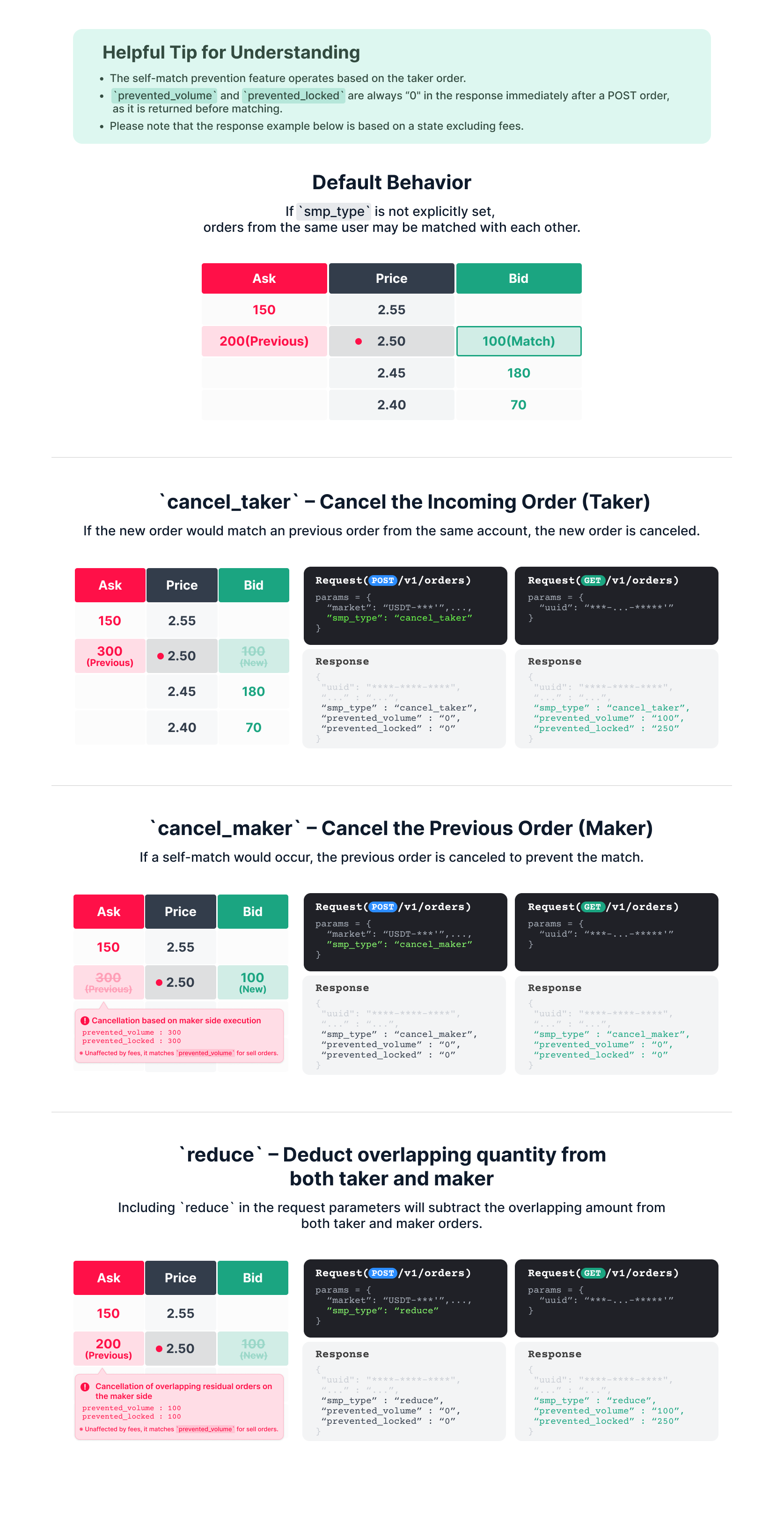
cancel_maker | Cancels the maker order while keeping the taker order to prevent self-trading. |
cancel_taker | Cancels the taker order while keeping the maker order to prevent self-trading. |
reduce | Reduces the overlapping quantity from both maker and taker orders to prevent self-trading. Orders with remaining quantities stay open. |
none | Does not apply SMP. Orders placed by the same user may match and execute. |
If smp_type is not specified, SMP is not applied. This is equivalent to explicitly setting smp_type=none.
Additional SMP Information
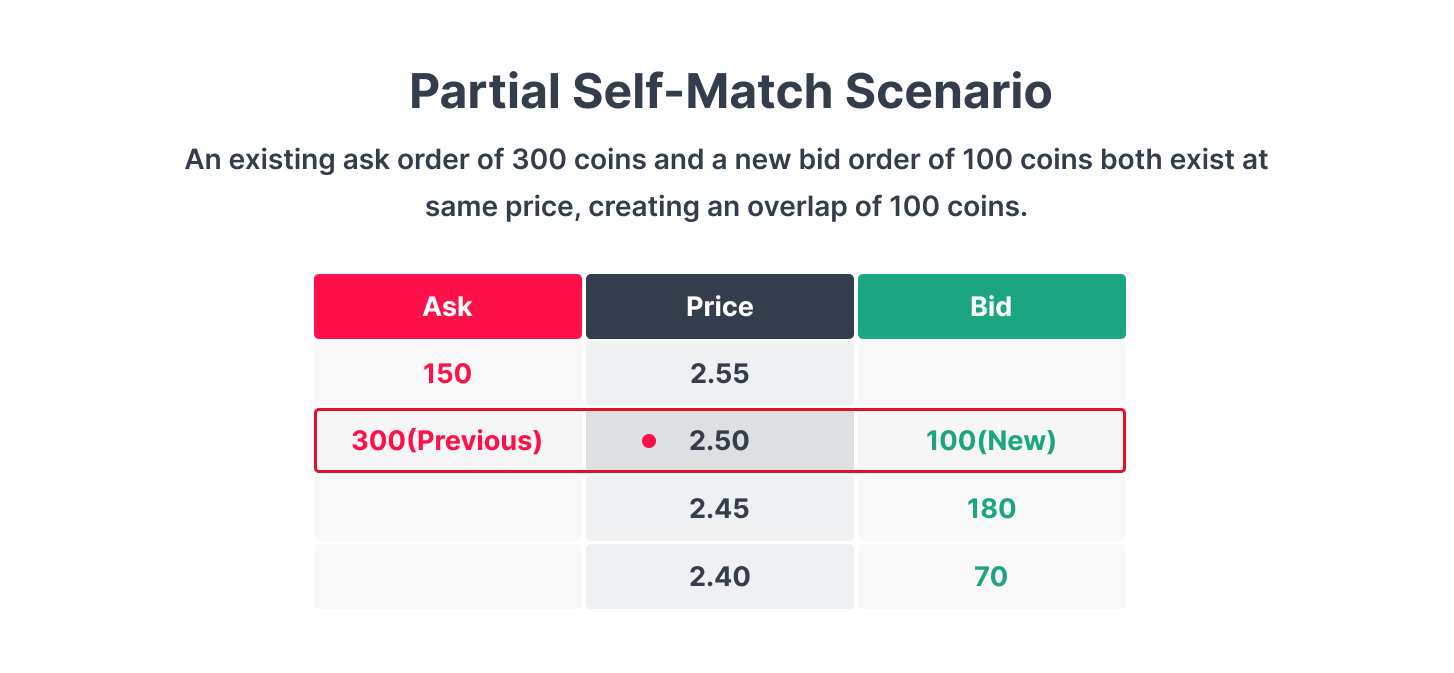
How does SMP work with Post Only orders?
For orders with time_in_force=post_only, the following rules apply:
smp_type=nonecan be used withpost_only.- If
smp_typeis omitted, the order is processed in the same way as whensmp_type=noneis specified. smp_type=cancel_maker,cancel_taker, andreducecannot be used withpost_only.
How can I check if an order was prevented from executing due to SMP?
If an order is canceled or its quantity is reduced due to SMP, the following fields in the order response can be used to check the result.
| Field | Description |
|---|---|
smp_type | SMP mode applied to the order. Returns none when SMP is not applied. |
prevented_volume | Volume or amount prevented from execution due to SMP. |
prevented_locked | For buy orders, the prevented locked amount. For sell orders, the prevented order volume. |
When subscribing to My Order and Trade (MyOrder) data via WebSocket, you can check the SMP result using the state field.
prevented: The order quantity or amount was reduced due to SMP.cancel: The order was canceled because no remaining quantity or amount was left after SMP was applied.
Notes
- SMP is optional. If
smp_typeis omitted or set tonone, SMP is not applied, and orders placed by the same user may match and execute. - Self-matching is checked at the time of trade execution, not at the time the order is placed.
- SMP supports applicable order types, including market, limit, stop-limit, IOC/FOK, and cancel-and-replace orders.
- For orders with
time_in_force=post_only, omitsmp_typeor set it tonone. Thecancel_maker,cancel_taker, andreducemodes cannot be used withpost_only. - The
prevented_volumeandprevented_lockedfields are provided as follows:- Buy orders:
prevented_volumerepresents the prevented amount including fees, whileprevented_lockedrepresents the prevented locked amount. - Sell orders: Both fields represent the prevented order volume.
- Buy orders:
- The
smp_type,prevented_volume, andprevented_lockedfields are always included in order-related REST API responses. - If
smp_typeis omitted from the order request, the response returns none. - If SMP is not applied,
prevented_volumeandprevented_lockedreturn 0. - For orders created before November 9, 2026, without specifyin
smp_type, the response also returnsnone. - The SMP-related fields are also included in MyOrder WebSocket responses. When SMP is not applied,
smp_typereturnsnoneinstead of null.
Updated 7 days ago